AI Photo Generator - ReCrea
- 4.6
- Rating
- 100.00K
- Installs
- Free
- Price

 Analysis by App-foxy
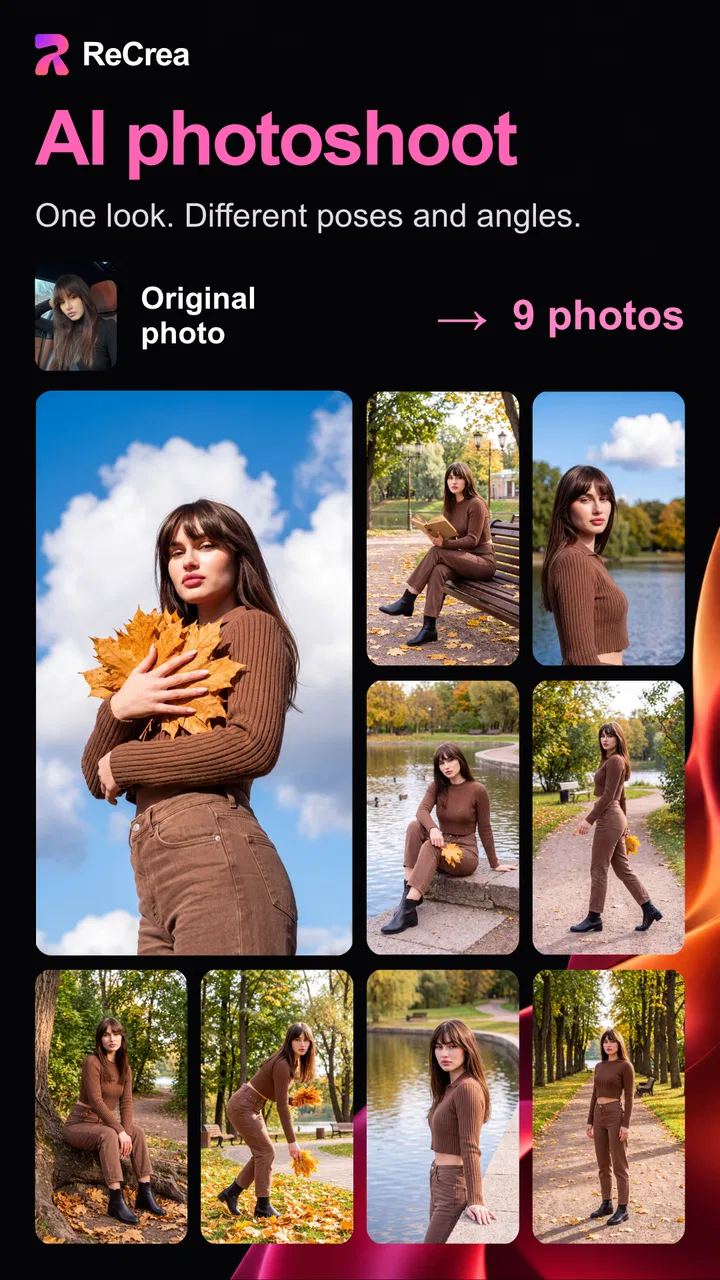
I spent time with AI Photo Generator - ReCrea as a photography app built around quick AI image transformations rather than traditional camera controls. Its appeal is easy to understand: you provide a selfie or another suitable photo, choose the kind of result you want, and wait for the app to turn that starting image into something more stylized. In my experience, the interesting part is not simply the novelty of seeing an altered face. It is how the app fits into small, connected moments when I want an image for a profile, a joke with friends, a creative experiment, or a more polished-looking portrait without opening a full photo editor.
The app comes from S18 and is free to install, with optional in-app purchases priced from $2.99 to $174.99 per item. It is listed for Everyone, runs on Android 8.0 and later, and the current version is 4.30. With a 4.6 average from around 1.7 thousand ratings and over 100 thousand installs, it has attracted a meaningful audience without feeling like a general-purpose social network. I see it more as a focused image-making tool: open it when I have a visual idea, supply a photo, and judge whether the generated result is worth saving or sharing.
How the connected workflow shapes the experience
I find that a connected generation workflow rewards a little planning: choosing the image and deciding what I want from it before I start makes the waiting feel purposeful, not like trial and error. It also helps me think ahead to where the finished portrait will go, since a playful share and a professional profile call for different standards. That handoff from experiment to actual use is where the result either earns its place or stays a curiosity.
You May Also Like

 AccuWeather: Weather Radar
AccuWeather Review: A Quick, Clear Forecast for Everyday Decisions
For everyday plans, the best forecast is the one you can understand quickly. AccuWeather makes rain timing, radar, and local conditions easy to act on, with a few trade-offs.

 Hill Climb Racing
Why Hill Climb Racing Still Turns Crashes Into One More Run
A tiny car, a bumpy hill and one more upgrade: Hill Climb Racing keeps resurfacing because its simple chaos makes every near-miss feel personal.

 AliExpress - Shopping App
AliExpress Makes Global Shopping Feel Personal, but Shoppers Bear the Risk
AliExpress turns a global marketplace into a pocket-sized discovery engine. Its reach is useful, its shopping loop compelling, and its trade-offs easy to miss.

 Lords Mobile: Kingdom Wars
Lords Mobile Is a Kingdom-Building Routine, Not a Quick Match
A case-by-case verdict on the building, battles, device demands, and social commitments that make Lords Mobile rewarding for some players and exhausting for others.

 PDF Scanner app - TapScanner
TapScanner Makes Paperwork Easier to Capture, Check, and Share
TapScanner makes scanning with a phone feel less like a rescue operation and more like a dependable step in getting work done. Its capture tools are useful, though not flawless.

 Block Blast!
 Shows How Much a Puzzle Game Can Leave Out
A quiet grid game shows why puzzle players increasingly value instant clarity, repeatable skill and low-pressure play—and where the genre still needs to catch up.
More From Our News Desk
View All News


Why the first few minutes depend on a reliable connection
The central experience is remote-feeling by nature. AI image generation requires more than the quick adjustments I would expect from cropping, exposure, or a filter. When I submit an image, the important work happens after the request leaves the phone, so the quality of my connection affects how patient I need to be. On a strong network, the process feels like a simple creative loop: choose a source image, make a request, wait, inspect, and try again if the interpretation is not right.
That rhythm changes on a weak or busy connection. The app is much less satisfying when I am trying to create something during a short break and the request takes longer than expected. I would not treat it like a camera app that is always ready for an instant result. It is better suited to moments when I can leave the screen open for a little while and give the generation process room to finish.
This is also why I recommend preparing the source photo before starting. A clear, front-facing selfie with a simple background gives me a better starting point than a dim group shot taken in motion. I check the image in my gallery first, make sure the face is visible, and only then begin the AI workflow. That small habit reduces wasted attempts, which matters when each generation depends on a network request and may consume an available allowance or lead toward a purchase.
AI portraits are more useful when the prompt has a purpose
The app’s focus on action figures, headshots, and playful selfies gives it a broader range than a basic beauty filter. A normal filter changes the appearance of the same pixels in a predictable way. ReCrea is more interpretive: it can reimagine the person as a character or produce a portrait with a different visual identity. That makes it useful for brainstorming profile images, imagining a collectible-style version of yourself, creating a birthday surprise, or testing a visual idea before committing to a professional photo session.
I found that the best results come from treating each attempt as a visual brief rather than pressing a button without a plan. Before uploading, I decide whether I want a believable headshot, a clearly fictional character, or a humorous selfie. I also choose a source image that matches that goal. A neutral expression is more flexible for a polished portrait, while an expressive selfie can work better for a playful result. This is a practical distinction that a short store description does not really explain.
There is a trade-off here. AI generation can produce an image that is more imaginative than accurate, and that is part of the fun, but it can also move away from the person in the original photo. If I need a faithful professional portrait for a résumé or business profile, I would still prefer a conventional camera, careful lighting, and a standard editor. If I want an eye-catching concept image or a lighthearted transformation, the looser interpretation becomes an advantage.
What mobile use feels like in everyday situations
On a phone, the app makes the most sense in short creative sessions. Imagine taking a lunch break, finding a well-lit selfie from the morning, and wanting a quick profile-image experiment before a video call later in the day. I can prepare several candidate photos, submit the strongest one, and compare the result with the original. The process is convenient because I do not need a desktop editor or a collection of design skills to get started.
It is also a good companion for social occasions. At a birthday gathering, I could take individual portraits and make playful action-figure concepts for the people who agree to participate. The important practical point is consent: a generated image can look convincing enough to be misunderstood, so I would label it clearly when sharing it. The app is most enjoyable when everyone treats the result as a creative transformation rather than a factual representation.
For travel, commuting, or outdoor use, I would plan around connectivity instead of assuming the app will behave like an offline photo editor. I can capture photos while away from a dependable network, but I would wait to submit them until I have a connection I trust. That makes the app less suitable for an immediate roadside workflow and more suitable for processing a small batch later at a hotel, café, or home.
Keeping the phone workflow efficient
My most useful mobile habit is to separate capture from generation. I do not repeatedly take new photos while standing in poor light and hoping the next attempt will fix everything. I take a few deliberate pictures first, review them, and then use the best candidate. This saves time and avoids sending several weak images through the same connected process.
I also keep the original photo untouched. AI results are experiments, not replacements, and retaining the source lets me compare whether the generated image actually improves the intended use. For a headshot, I look at face consistency, expression, and whether the background supports the purpose. For an action-figure concept, I care more about the overall character idea and whether the face remains recognizable enough to make the joke work.
Another useful trade-off is screen size. A phone is ideal for choosing a photo and sharing a result quickly, but it is not the best place to inspect tiny facial details. Before using an image publicly, I zoom in and check the eyes, teeth, hairline, hands, and edges of clothing. AI portraits can look impressive at a glance while revealing odd details on closer inspection. That check is especially important if I am considering a result for a professional profile rather than a private message.
When a request fails or the result is disappointing
Network-dependent tools need a little patience when something goes wrong. If a generation appears stuck, my first response is not to tap repeatedly. I check whether the connection is stable, give the request a moment, and avoid creating several duplicate submissions. Repeated taps can make it harder to tell whether the original request is still processing or whether a new one has started.
If the result is poor, I treat that as a source-image problem before blaming the entire app. I try a brighter portrait, a more direct angle, and a less crowded background. A face partly hidden by sunglasses, hair, or another person gives the AI less useful information. Changing the source photo is often more productive than making the same request again with an image that already has obvious limitations.
Recovery also means knowing when to stop. Because the app is free to install but includes paid items, endless experimentation can become an expensive habit if I keep chasing a perfect variation. I set a small creative goal before starting: one usable headshot, one fun character concept, or a few options for a profile update. If the results are not moving closer to that goal, I save the best attempt and leave rather than treating every failed generation as a reason to spend more.
I would be cautious about using the app for anything time-sensitive. If I need a final image for an application, event, or client message within minutes, a normal editor is more predictable. A connected AI workflow introduces waiting and interpretation, so it is better for exploration than for a deadline where the exact output matters.
Using personal photos thoughtfully
Any app that transforms selfies deserves a careful approach to the images I submit. I use photos I am comfortable processing through an online service, avoid uploading other people without their permission, and do not treat a generated portrait as proof of how someone actually looks. This is not just a privacy-minded habit; it also prevents awkward situations when a playful image is shared beyond the original audience.
I am also selective about the source material. A casual selfie may be perfect for an action-figure idea, but a professional headshot request calls for a photo with suitable clothing, expression, and framing. The generated style cannot fully rescue a source image that sends the wrong message. I would rather spend a minute choosing a better original than spend several attempts trying to force a casual snapshot into a formal portrait.
Because the app offers purchases, I would review the purchase screen carefully before confirming anything. The listed range reaches from $2.99 to $174.99 per item, which is a wide spread. I would not assume that installing the app means every style or generation option is included at no cost. For a casual user, the sensible approach is to explore the free experience first, understand what is available, and decide whether a particular result justifies spending money.
That pricing structure affects who I would recommend it to. Someone who enjoys experimenting with AI images and expects to make repeated creations may find value in paid options. Someone who wants one polished portrait and dislikes variable costs may be happier with a conventional portrait app or a one-time editing tool. The right choice depends less on the headline effect and more on how often the user expects to generate images.
Where it stands beside familiar photography alternatives
Compared with a standard selfie editor, ReCrea is more ambitious but less predictable. A conventional editor is better for removing a blemish, correcting brightness, straightening a photo, or applying a consistent look across a set of images. Those tools preserve the original scene and give me direct control. ReCrea is better when I want the app to reinterpret the image and supply a new concept rather than simply polish what I already captured.
Compared with a dedicated professional headshot service, it is faster to try and much easier to use casually, but I would not expect the same control over lighting, wardrobe, facial accuracy, or brand consistency. For a freelancer testing several profile directions, it can be a useful first sketch. For a regulated profession or a formal company identity, I would choose a real photo session or a carefully controlled editor.
Compared with a social platform’s built-in effects, the photography focus feels more intentional. Social effects are excellent for instant sharing, but they are often tied to a live camera moment. Here, I can start from an existing photo and think about the final image as a small creative project. The cost is that the process may depend more heavily on a stable connection and may involve paid choices.
Who should try it and who should skip it
I would recommend ReCrea to people who enjoy visual experimentation, want a quick route to an AI character concept, or need several playful ideas for a selfie or profile image. It is particularly appealing if the user is comfortable judging results critically instead of expecting every generation to be publication-ready. The action-figure angle gives it a clear personality, while the headshot and selfie uses make it more practical than a novelty tool with only one kind of effect.
I would skip it if my priority were precise retouching, guaranteed consistency, offline editing, or a single predictable export for an urgent task. I would also hesitate to recommend it to anyone who feels uncomfortable uploading personal portraits to a connected AI service. In that situation, a local photo editor is a better fit, even if it cannot create the same kind of imaginative transformation.
The Everyone age rating makes it approachable for a broad audience, but that does not remove the need for sensible sharing. Younger users may need guidance about uploading faces, spending through in-app purchases, and making it clear when an image is AI-generated. The app can be fun for family projects, but I would keep the creative activity transparent and supervised when children are involved.
My connectivity verdict after using it
AI Photo Generator - ReCrea works best when I treat it as a connected creative studio in miniature, not as a replacement for a camera or a traditional editor. Its strongest moments come from turning an ordinary portrait into something with a clear concept: a collectible-style character, a more imaginative selfie, or a first draft of a profile image. The experience is convenient on mobile, but the convenience depends on choosing good source photos, having a reliable connection, and allowing time for generation.
My final advice is simple: start with one carefully chosen image, decide what you want the result to do, and inspect the output before sharing it. Keep the original, avoid submitting other people’s faces without permission, and pay attention to the purchase flow rather than assuming every experiment is free. Those habits make the app more enjoyable and reduce the frustration that comes from weak source material, unstable connectivity, or repeated attempts without a clear goal.
For me, the app earns a place among casual photography tools because it offers a kind of transformation that ordinary filters cannot. It is not the right answer for every portrait task, and its connected nature means I would not rely on it in a hurry. But when I have a few minutes, a decent selfie, and an idea worth exploring, AI Photo Generator - ReCrea gives me an accessible way to see that idea take shape. It is free to begin, developed by S18, and worth trying if imaginative results matter more to me than perfect control.
FAQs for AI Photo Generator - ReCrea
01What is AI Photo Generator - ReCrea and what can it do?
AI Photo Generator - ReCrea is an image-creation and photo-editing app that uses artificial intelligence to turn written prompts or existing pictures into new visual content. Depending on the available tools, you can create portraits, artistic variations, social-media images, avatars, and imaginative scenes. It is designed for casual users, creators, and anyone who wants to experiment with AI-generated photography without using complicated desktop software.
02Is AI Photo Generator - ReCrea free to download and use?
The app may be available as a free download, but some features can require credits, subscriptions, or in-app purchases. Free access may also include limits on the number of generations, available styles, export quality, or processing speed. Before creating many images, check the pricing page and subscription terms carefully, especially if a free trial is offered, because trials can automatically renew unless canceled through your Google Play or App Store account.
03Do I need an internet connection to use AI Photo Generator - ReCrea?
Most AI image-generation features require an active internet connection because your prompt or uploaded image is processed on remote servers rather than entirely on your phone. This means results may take longer on weak networks, and mobile data usage can increase when uploading photos or downloading high-resolution images. Basic browsing or previously saved images may remain accessible offline, but full functionality generally depends on online access.
04Is it safe to upload personal photos to ReCrea?
You should review ReCrea’s privacy policy before uploading portraits, family pictures, identification documents, or any other sensitive material. AI photo services may process images on third-party servers, temporarily retain files, or use technical data to operate and improve the service. Avoid uploading confidential images, obtain permission before editing someone else’s photo, and check the app’s deletion, storage, and data-sharing policies if privacy is a major concern.
05Can I use images created with AI Photo Generator - ReCrea commercially?
Commercial use depends on ReCrea’s current terms, the plan associated with your account, and sometimes the licenses of any reference images, templates, or generated assets used in the process. Do not assume that every free image can be used for advertising, merchandise, client work, or monetized social media. If you need business-ready content, read the licensing conditions and confirm whether paid plans provide broader usage rights.
Pros
- Creates varied images from simple text prompts.
- Offers creative styles for portraits
- art
- and social content.
- Easy interface suitable for users without editing experience.
- Useful for generating ideas
- concepts
- and visual inspiration.
- Convenient mobile access for creating images on the go.
Cons
- Results may differ noticeably from the details in your prompt.
- Some features or generations may require credits or a subscription.
- AI images can include distorted hands
- faces
- or small details.
- Processing times may increase during busy periods.
- Generated content may raise copyright or commercial-use questions.

AI Photo Generator - ReCrea
Gallery